(505) 325-4900 chris@cornerstoneresults.com
  • Site Map
  • Knowledge Bank
  • Dashboards 101
  • G-O-Vantage
  • Photo Gallery
Cornerstone Business Solutions
  • Home
  • About Us
    • What Makes Cornerstone Unique?
    • About Chris Hunter
    • A Note from the Founder
    • Our Alliances
  • Services
    • Business Diagnostics
    • Digital Data Dashboards
  • Clients
    • Project Portfolio
  • How We Work
    • Thoughts on Pricing
  • Reference Library
    • Business Links
    • Knowledge Bank
    • Cornerstone PowerPoint Presentations
  • Contact
Select Page
Cornerstone Business Solutions > MS Office, Acrobat & PC Tips > Microsoft Excel Tips - Part One

10 Steps to Creating a Scrolling Excel Chart

by Chris Hunter | Mar 19, 2016 | Microsoft Excel Tips - Part One

10 Steps to Creating a Simple Break-Even Template in Excel

by Chris Hunter | Mar 19, 2016 | Microsoft Excel Tips - Part One

20 Principles for Good Spreadsheet Practice – PDF Document

by Chris Hunter | Jul 4, 2018 | Microsoft Excel Tips - Part One

Download [2.70...

3 Tips for Using Excel’s Conditional Formatting More Efficiently

by Chris Hunter | Mar 19, 2016 | Microsoft Excel Tips - Part One

3 Ways to Fill Blank Cells in an Excel Spreadsheet

by Chris Hunter | Mar 19, 2016 | Microsoft Excel Tips - Part One

75 Essential Excel Tips

by Chris Hunter | Mar 19, 2016 | Microsoft Excel Tips - Part One

83 Excel Tips Every User Should Master

by Chris Hunter | Jun 1, 2021 | Microsoft Excel Tips - Part One

Whether you are a Microsoft Excel beginner or an advanced user, you’ll benefit from these step-by-step tutorials. Click here to learn more.

85 Excel Keyboard Shortcuts

by Chris Hunter | Mar 19, 2016 | Microsoft Excel Tips - Part One

Add a Chart to a MS Excel Comment

by Chris Hunter | Mar 20, 2016 | Microsoft Excel Tips - Part One

ASAP Utilities – Simply a “Must Have” Add In for Serious MS Excel Users

by Chris Hunter | Mar 20, 2016 | Microsoft Excel Tips - Part One

I’m often asked how I do what I do in MS Excel with such ease and speed.  Part of the answer is years of experience and part of the answer comes down to using some help and ASAP Utilities is one of my key helps. The good folk who put this tool together know what...

Calculate Conditional Running Totals in MS Excel

by Chris Hunter | Mar 20, 2016 | Microsoft Excel Tips - Part One

Choosing between Vlookup and Index-Match formulas

by Chris Hunter | Mar 4, 2020 | Microsoft Excel Tips - Part One

From Excel Zoom INDEX()+MATCH() and VLOOKUP(), both have their proponents and opponents. Both of these formulas perform almost the same function. Both have pros and cons. In today’s tutorial we will try to compare their usage and that how they can be used to get most...
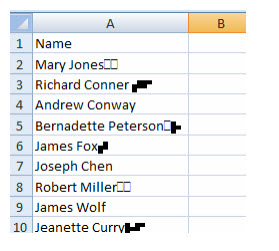
Clean Up MS Excel Data of Printable Artifacts

Clean Up MS Excel Data of Printable Artifacts

by Chris Hunter | Mar 20, 2016 | Microsoft Excel Tips - Part One

Combine Text and Dates in the Same Cell

by Chris Hunter | Mar 20, 2016 | Microsoft Excel Tips - Part One

Conditional Formatting to Find Locked and Unlocked Cells

by Chris Hunter | Mar 20, 2016 | Microsoft Excel Tips - Part One

Copy Hundreds of Rows of Excel Formulas in Three Steps

by Chris Hunter | Mar 20, 2016 | Microsoft Excel Tips - Part One

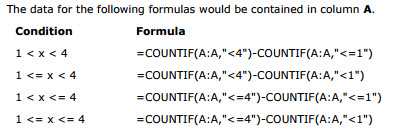
Count If Functions for Two Conditions

Count If Functions for Two Conditions

by Chris Hunter | Mar 20, 2016 | Microsoft Excel Tips - Part One

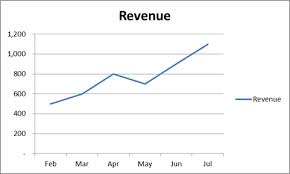
Create a MS Excel Chart That Automatically Updates with New Data

Create a MS Excel Chart That Automatically Updates with New Data

by Chris Hunter | Mar 20, 2016 | Microsoft Excel Tips - Part One

Creating a Floating Column Chart in MS Excel

by Chris Hunter | Mar 20, 2016 | Microsoft Excel Tips - Part One

Creating a Summary Report in MS Excel with Data Consolidation

by Chris Hunter | Mar 20, 2016 | Microsoft Excel Tips - Part One

Creating an Index Sheet for a MS Excel Workbook

by Chris Hunter | Mar 20, 2016 | Microsoft Excel Tips - Part One

Loading... Taking too long? Reload document | Open in new tab Download [69.91 KB] The necessary VBA code for insertion into the Index page is below. Private Sub Worksheet_Activate() Dim wSheet As Worksheet Dim M As Long M = 1 With Me .Columns(1).ClearContents...

Tags

Accounting Accounts Receivable Advertising Boards of Directors Branding Brochure Business Cards Business Plans Buying a Business Career Cash Flow Management Change Management Coaching Compensation Computers Contracts Corporate Structures Corporation CRM Customer Satisfaction Customer Service Defensive Strategy Delegation Direct Mail Disaster Planning Due Diligence e-marketing Entrepreneurship Assessment Ergonomics Ethics Family Business Finance First Impressions Franchises Guarantees Hiring Image Intellectual Property Interviewing Inventory Job Descriptions Job Search KPI Leader Leadership Lifetime Customer Value Listening llc Management Marketing Marketing Strategy Market Research Media Meetings MS Excel MS Outlook MS Powerpoint MS Word Networking Operations Organizational Design Partnerships PC Tips People Management POS Pricing Process Improvement Process Improvementhip Productivity Profit Improvement Project Management Public Speaking Purchasing Ratios Retention Retirement Planning Risk Management S-corp Safety Sales Compensation Sales Growth Sales Management Seller Financing Selling a Business Selling Skills Social Media Soft Skills Software Sponsorships Startups Succession Planning Taxes Technology Telephone Service Skills Time Management Trade Shows Training Trend Analysis Valuation Value Matrix VBA Vision Web Sites Windows Tips

Chris Hunter, MBA

Chris’ combination of academic credentials, career experience and temperament ideally suit his calling as a business development advisor. Clients say he has a mind for business and a heart for service.
Read More About Chris and Cornerstone Business Solutions >>
Call Chris at (505) 325-4900 or e-mail click here

Copyright © 2001 - 2026 Cornerstone Business Solutions

  • About Us
  • Services
  • Contact
  • Legal
linkedIn logo
Manage Cookie Consent
To provide the best experiences, we use technologies like cookies to store and/or access device information. Consenting to these technologies will allow us to process data such as browsing behavior or unique IDs on this site. Not consenting or withdrawing consent, may adversely affect certain features and functions.
Functional Always active
The technical storage or access is strictly necessary for the legitimate purpose of enabling the use of a specific service explicitly requested by the subscriber or user, or for the sole purpose of carrying out the transmission of a communication over an electronic communications network.
Preferences
The technical storage or access is necessary for the legitimate purpose of storing preferences that are not requested by the subscriber or user.
Statistics
The technical storage or access that is used exclusively for statistical purposes. The technical storage or access that is used exclusively for anonymous statistical purposes. Without a subpoena, voluntary compliance on the part of your Internet Service Provider, or additional records from a third party, information stored or retrieved for this purpose alone cannot usually be used to identify you.
Marketing
The technical storage or access is required to create user profiles to send advertising, or to track the user on a website or across several websites for similar marketing purposes.

  • Manage options
  • Manage services
  • Manage {vendor_count} vendors
  • Read more about these purposes
View preferences
  • {title}
  • {title}
  • {title}